Cloud IBR vs. Veeam Vault Instant Recovery: Practical Recovery Comparison
The question that matters
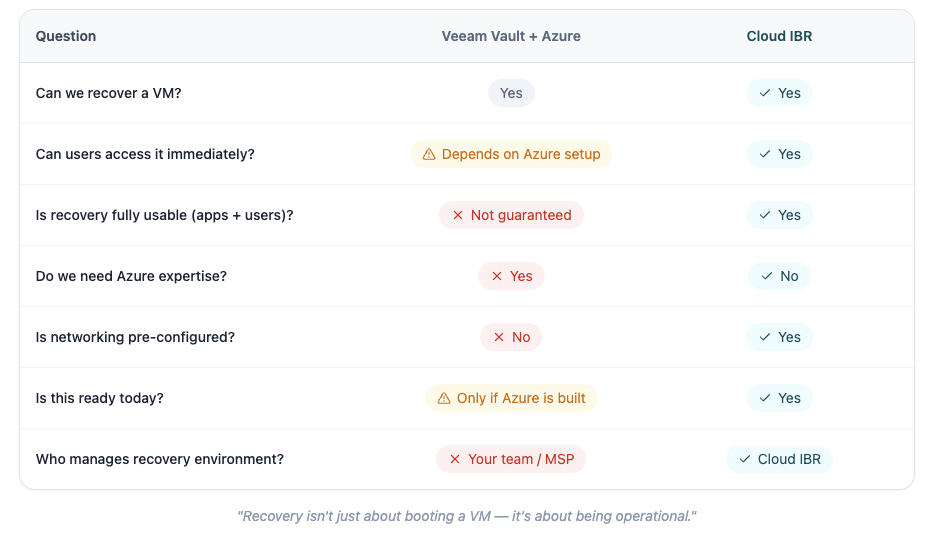
“If we recover tomorrow, who actually gets us operational?”
If that answer is unclear, recovery is not ready.
Backups are not the problem
Most organizations using Veeam already have backups in place.
The real risk is whether those backups can be turned into a working, accessible environment during an outage.
With Veeam Vault and Azure instant recovery, there is a growing assumption that recovery is now “handled.”
In practice, there is a significant gap between:
- Recovering infrastructure vs. delivering a usable environment
What Veeam Vault Instant Recovery Promises
At a high level, the value is clear:
- Recover workloads into Azure quickly
- Reduce recovery time (RTO)
- Avoid building a secondary physical site
In controlled environments and demos, this works well.
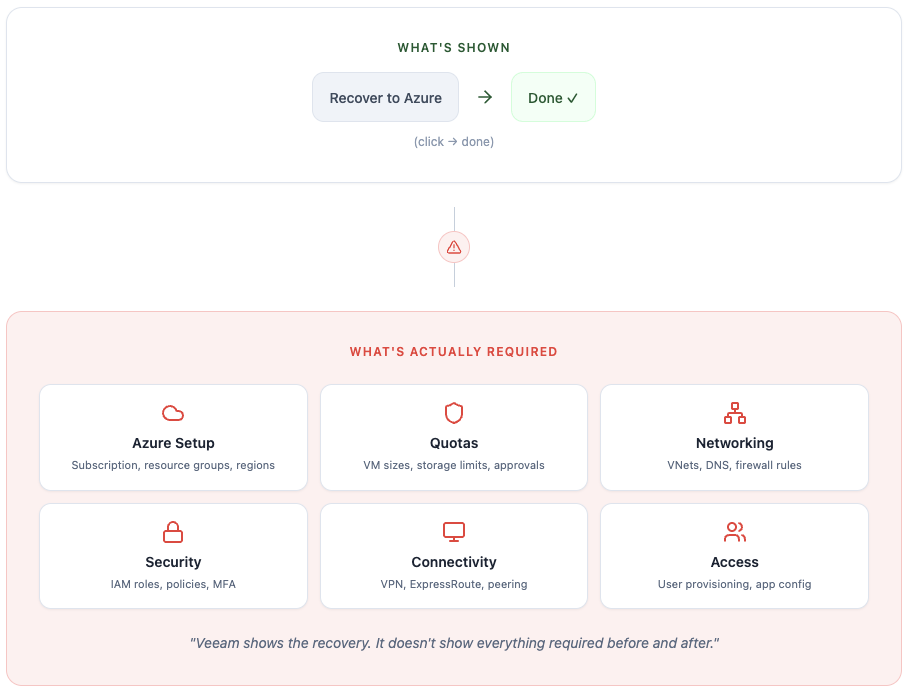
But the real-world outcome depends on everything outside the recovery workflow itself.
Where It Actually Gets Difficult
1. Azure must be ready before recovery
The Veeam workflow assumes Azure is already configured and ready.
That includes:
- Subscriptions and billing
- Compute sizing and availability
- Region selection
- Networking design
- Security controls
If Azure is not prepared, recovery will fail or stall before it begins.
2. Quotas can block recovery
Azure enforces quota limits on compute resources.
These limits are:
- Region-specific
- Resource-specific
- Often insufficient by default
Quota increases require individual requests and approval.
Without them, recovery cannot proceed – even if everything else is configured correctly.
3. Recovery does not equal usability
A recovered VM in Azure does not mean the business is operational.
For recovery to be usable:
- Users must be able to connect
- Applications must communicate
- Systems must be reachable and functional
These dependencies sit outside the Veeam workflow.
4. Connectivity and security must be built
After recovery, teams must solve:
- How users access recovered systems
- Whether to assign public IPs
- How to secure exposed resources
- How to establish private connectivity (VPN, routing, etc.)
These are not handled automatically.
They require planning and expertise.
5. Testing is harder than expected
A meaningful DR test requires more than a successful recovery job.
It requires:
- Full environment recovery
- User access validation
- Application functionality
- Repeatability
Many teams never reach this level of testing.

When Veeam Vault + Azure Makes Sense
This approach is valid for organizations that already:
- Run production workloads in Azure
- Maintain hybrid environments
- Have internal Azure expertise
- Manage networking and security in the cloud
In these cases, Azure recovery is an extension of existing infrastructure.
Where It Breaks for MSPs and SMBs
Most MSPs and SMBs:
- Use Veeam for backup
- Rely on object storage
- Do not operate production environments in Azure
- Do not have dedicated cloud engineering resources
As a result, Azure recovery introduces:
- New technical requirements
- New operational overhead
- New points of failure
At the moment recovery is needed most.
Cloud IBR: Built for Recovery Readiness
Cloud IBR is designed to remove this complexity.
Instead of requiring teams to build and manage Azure recovery environments, it:
- automates infrastructure provisioning
- provides built-in connectivity and access
- supports repeatable recovery testing
- allows workloads to run during an outage
The focus is not just recovery.
It is operational recovery.
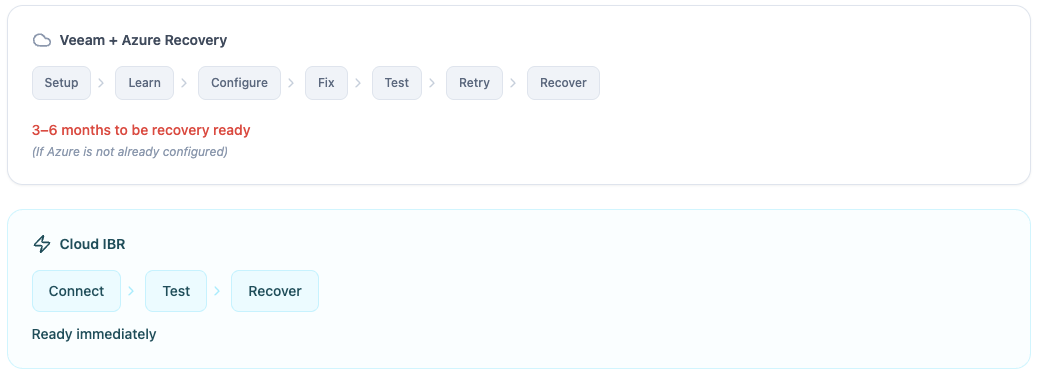
7 Steps + Months to be Recovery-ready in Azure.
3 Steps + Minutes to be Recovery-ready via Cloud IBR.
The Real Questions?
Instead of asking:
“Can we recover to Azure?”
Ask:
- Has this been tested end-to-end?
- Can users connect immediately?
- Who owns the Azure environment?
- What happens if quotas or access fail?
These are the questions that determine whether recovery will actually work.
Final Takeaway
Veeam Vault instant recovery is a valid capability.
But for many organizations, it introduces complexity that delays or prevents true recovery readiness.
Cloud IBR removes that barrier.
It turns existing Veeam backups into a usable recovery environment – without requiring teams to become Azure infrastructure experts