Many organizations make a common mistake of confusing backups with disaster recovery (DR). Although they share the common goal of data protection, they serve distinct purposes. Regardless of how much you have invested in your backup system, how sophisticated it is, or whether you are following the 3-2-1 rule; backups alone are not enough to classify as disaster recovery, nor are they a DR plan.
Before looking at these differences and comparing the two, it is important to first understand what each is and how they play an essential part in creating a robust strategy to safeguard your business against disruptions.
What is Backup as a Service (BaaS)
Backup involves creating copies of critical data to protect against data loss. These copies are securely stored in various locations, such as external hard drives, cloud storage, or a mix of both. Backups are designed to ensure data preservation, allowing you to restore files or datasets in case of accidental deletion or corruption.
For instance, exporting data from a CRM and storing it in one of these locations would be seen as performing a backup.These copies are snapshots of the business information that the organization needs in order to carry out important functions. However, backups are limited to the data only and do not include the systems or infrastructure to manage the data.
For example, while a backup may store all customer information as a CSV file, it would not include the tools or processes to send DRIP emails, flag leads, or assign tasks. Restoring the system requires re-importing the data manually, leaving operations down until fully restored.
What is Disaster Recovery as a Service (DRaaS)
Disaster recovery goes beyond data preservation. It is a complete strategy for recovery in which in the event of an outage, the full system can be restored and business can continue. DR involves processes, planning, testing, setting recovery objectives, and having infrastructure in place to failover and failback.
Unlike backups, which focus solely on data preservation, disaster recovery goes a step further ensuring that entire IT systems, infrastructure, and operations can be brought back online in a seamless manner thus reducing downtime and interrupting of business operations.
Using the same example from backup, disaster recovery would encompass not only backing up the CRM data but also having the infrastructure, software, and processes in place to quickly restore the entire CRM system. This means that instead of being left with just a CSV file of customer data, the DR solution would allow the system to resume full functionality, enabling DRIP campaigns and all other operations to continue. With disaster recovery downtime is minimal with failback restoring business continuity almost immediately.
Key Differences Between Backup and Disaster Recovery
Now that we’ve defined backup and disaster recovery, let’s look at six ways in which they differ.
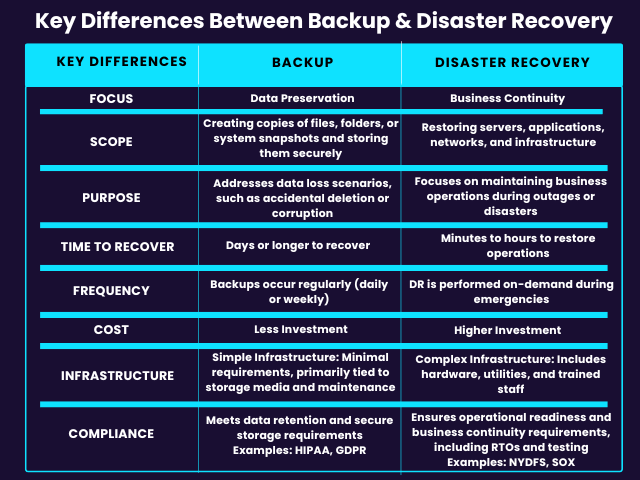
Focus and Scope
While both backup and disaster recovery aim to protect data, their focus and scope set them apart.
Backup as a Service
- Data preservation
- Creating copies of files, folders, or system snapshots and storing them securely
Disaster Recovery as a Service
- Business continuity
- Restoring servers, applications, networks, and infrastructure
Purpose
Addresses different challenges with distinct end result functionality differences
BaaS
Addresses data loss scenarios, such as accidental deletion or corruption
DRaaS
Focuses on maintaining business operations during outages or disasters
Time to Recover
Recovering from backups takes significantly longer and often involves a laborious process. In general recovery times look like:
- Backup: Days or longer to recover
- Disaster Recovery: Minutes to hours to restore operations
Frequency
Backups occur regularly on a daily or weekly basis whereas Disaster Recovery is performed on demand when needed. In best practice, DR tests are performed monthly to ensure the plan is ready for when needed.
Cost and Infrastructure
While both backup and disaster recovery require investment, their costs and infrastructure needs are different.
Backup
- Less Investment: Primarily focused on data storage, making it more cost-effective
- Simple infrastructure: Minimal requirements, with costs primarily tied to storage media and maintenance
Disaster Recovery
- Higher Investment: Requires redundant systems, DR servers, and a separate recovery environment
- Complex Infrastructure: Includes hardware, utilities, and trained staff
Compliance and Regulatory Requirements
Compliance needs vary widely across industries with some organizations focusing on data retention while others require robust plans for business continuity to meet regulations or cybersecurity requirements.
Backup
- Meets compliance for data retention, secure storage, and archival mandates
- Examples:
- HIPAA: Requires encrypted backups to safeguard patient records.
- GDPR: Mandates retention policies and secure recovery of personal data.
Disaster Recovery
- Ensures compliance with operational readiness and business continuity requirements, including Recovery Time Objectives (RTOs) and periodic testing
- Examples:
- NYDFS Cybersecurity Regulation: Requires a tested Business Continuity and Disaster Recovery (BCDR) plan
- SOX: Demands rapid restoration of financial systems for audit readiness
Backup as a Service (BaaS) vs Disaster Recovery as a Service (DRaaS)
Now that the difference between disaster recovery and backup is clear, another question arises: how do Backup as a Service (BaaS), Backup Recovery as a Service (BRaaS) and Disaster Recovery as a Service (DRaaS) differ? Let’s break it down:
BaaS
- Managed backups
- Data preservation only
- Recovery is the customer’s responsibility
BRaaS
- Automated managed backups failover recovery
- Automated managed backups recovery testing
- Critical infrastructure and operational continuity with on-demand bare metal cloud
- Customer responsible for production infrastructure restoration
- Self managed or fully managed by a third party vendor
DRaaS
- Managed backups failover and failback recovery
- Full infrastructure and operational continuity with servers, applications, and systems replicated in a secondary data center
- Fully managed by third party vendor
Recover Your Backups With Cloud IBR
Cloud IBR bridges the gap between backups and disaster recovery, by providing your immutable Veeam backups with a seamless, automated disaster recovery solution.
Designed as a simple and cost-effective, disaster recovery SaaS platform, Cloud IBR enables you to recover your Veeam backups stored offsite in object storage providers like Backblaze B2, Wasabi, Cloudian, Veeam Data Cloud Vault, or Veeam Cloud Connect by leveraging on-demand bare metal cloud infrastructure.
How It Works:
- One-Click Deployment: Bare metal cloud servers are deployed instantly during a failover event.
- Automated Backup Import: Recovers Veeam backups stored in object storage or managed by Veeam Cloud Service Providers.
- Immediate Failover: Delivers a fully functional bare metal infrastructure environment with uninterrupted performance.
- Managed Failback (Platinum Plus): Synchronizes changes and transitions operations back to the production environment.
Learn More About How Cloud IBR Can Fortify Your Disaster Recovery Strategy
Best Practices For Disaster Recovery Testing
Updated: February 2nd, 2026 Though data loss, and discontinuation of work due to IT failure, are costly, disaster recovery plans are still largely missing from many business operations. Even those
What Are Bare Metal Cloud Servers: A Guide to Bare Metal Recovery
Businesses need high-performance computing, stronger security and flexible infrastructure. While conventional cloud services offer scalability they often lack the raw power and control necessary for the demanding workloads of mission-critical
Failover vs. Failback: Key Differences & Their Role in Disaster Recovery
Businesses face a constant threat of unexpected disruptions. Whether it’s a natural disaster, cyberattack, or simple power outage, these events can bring operations to a standstill. Depending on the length