
Most MSP client reports are built to show activity. Closed tickets. Alert counts. Hours logged. Backup job summaries. They prove the MSP was busy.
They do not prove the client is protected.
For MSPs offering backup and disaster recovery services, that distinction matters. Clients are not evaluating whether your team stayed occupied. They want to know whether their environment can survive ransomware, hardware failure, data corruption, or an unplanned outage. They want confidence that when something goes wrong, recovery is realistic and your team is ready to deliver it.
The problem is that most standard MSP reporting does not answer those questions.
This article focuses on the most important metrics: the ones that show backup health, recovery readiness, and service quality in terms a client can actually act on.
What Makes a KPI Worth Sharing With Clients?
Not every metric your team tracks internally belongs in a client-facing report. Many internal metrics are useful for operations, staffing, and margin management, but they create noise in a client conversation rather than clarity.
A simple filter helps decide what belongs in the report. A client-facing KPI should answer one of four questions:
- Are we protected?
- Can you recover us?
- Are you responsive?
- Are we getting value?

If a metric does not help the client answer one of those, it belongs on your internal dashboard.
A client report should be readable by a business owner, an operations lead, or a CFO who does not think in technical terms. If a metric needs a paragraph of explanation before it means anything, it is the wrong metric for that audience
Backup and Disaster Recovery KPIs MSPs Should Share
These are the metrics most MSP reports underrepresent. Lead with them. They are what separate a recovery-focused report from a generic service desk summary.
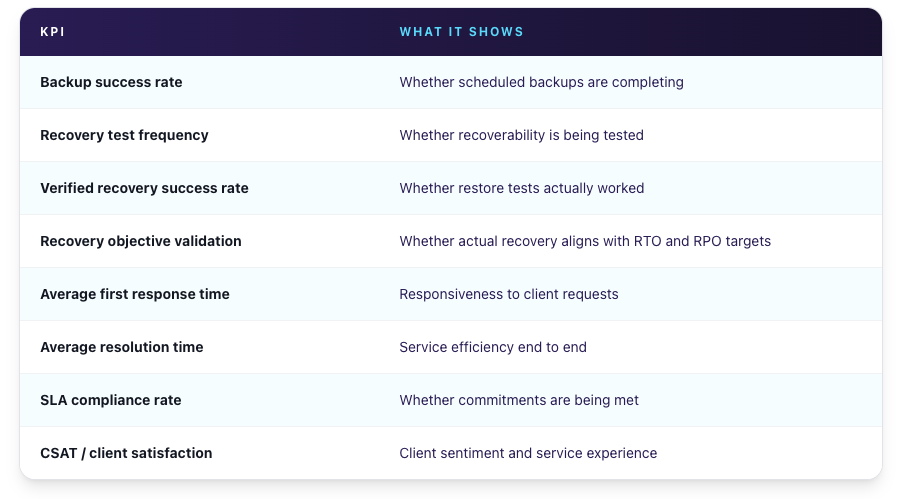
1. Backup Success Rate
What it measures: The percentage of scheduled backup jobs that completed successfully within a defined reporting period.
Why clients care: Clients expect confirmation that their data is being captured. Backup success rate gives them that confirmation in a single number.
What to watch: Do not oversell this metric. A 99% backup success rate is meaningful, but it does not prove recovery will work. It also needs context. A single failed backup tied to a mission-critical server is a more significant exception than five failed jobs across low-priority workstations. Report the rate, but call out exceptions and flag the systems they affect.
2. Recovery Test Frequency
What it measures: How often you validate that backups can actually be restored.
Why clients care: A backup that has never been tested is still an assumption. Recovery testing is what turns backup data into proof. It is also the cleanest way to show a client the difference between a process running and a process working.
The distinction that matters:
Telling a client “your backups completed” is not the same as telling a client “we tested your recovery and verified it worked.” Only the second statement gives them actual confidence.
A useful benchmark to track: the percentage of clients with a verified successful recovery test within the last 90 days. That number makes the commitment visible.
3. Verified Recovery Success Rate
What it measures: The percentage of recovery tests where targeted systems, applications, or workloads restored successfully.
Why clients care: This tells clients whether recovery worked in practice. Not whether the backup job ran, but whether the restore produced a usable result.
What this should confirm: A strong recovery test validates more than whether a server boots. It should confirm that critical services start, applications function, user access works, and the restored environment supports actual business operations. Reporting a verified recovery success rate holds the MSP accountable to that standard, not just to task completion.
4. Recovery Objective Validation Against Target
What it measures: Whether actual recovery test results meet the client’s agreed recovery objectives.
Two terms matter here, and they are worth defining plainly for non-technical stakeholders:
- RTO (Recovery Time Objective): How quickly systems need to be restored after an incident.
- RPO (Recovery Point Objective): How much data loss is acceptable, measured by the age of the last recoverable backup point.
Why clients care: Clients do not just need to know recovery worked. They need to know it worked fast enough, with an acceptable amount of data loss. A recovery that takes a day when the business needs four hours is a failed recovery, even if every file came back.
This is where reporting connects to commitment. Once RTO and RPO appear in a proposal, an SLA, or a service agreement, they stop being planning numbers and become promises. Reporting recovery objective validation proves those promises are achievable, tested, and defensible, rather than figures that sounded reasonable when the contract was signed.
Supporting Service KPIs That Still Matter
After leading with backup and recovery, include the service quality metrics clients have come to expect. These are not replacements for recovery proof. They show the service relationship is functioning well.
5. Average First Response Time
How quickly your team acknowledges and begins triaging a client request. This sets the tone for how the relationship feels day to day.
6. Average Resolution Time
How long it takes to fully close out an issue. This reflects efficiency and follow-through, not just speed of acknowledgment.
7. SLA Compliance Rate
The percentage of requests handled within agreed response and resolution windows. This makes your service commitments visible and measurable.
8. CSAT / Client Satisfaction
Satisfaction scores captured after support interactions. This reflects the client experience beyond the technical metrics and helps surface issues before they become churn risk.
Why Backup Completion Alone Is Not Enough
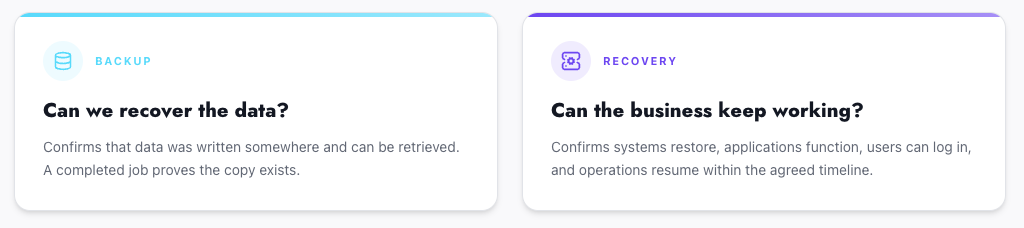
This is the most important distinction in the entire conversation, and the one most reports skip.
A completed backup job confirms that data was written somewhere. It does not confirm that a business can recover.
Backup completion does not validate:
- Whether systems can actually be restored
- Whether application dependencies will function after restoration
- Whether the recovery environment has the capacity to run production workloads
- Whether RTO or RPO will be met in a real incident
- Whether users can access systems and resume work
- Whether boot sequencing and network configuration come back correctly
Backup answers one question: can we recover the data? Recovery answers a different one: can the business keep working? Reporting on the first does not prove the second.
Backup success is a starting point. Recovery proof is what gives clients confidence.
What Good Client Reporting Should Actually Do
A well-constructed client report is not a data dump. It should accomplish four things.
Reduce ambiguity. Translate technical metrics into plain business language so the client never has to interpret what a number means.
Show progress. Help clients see trends across reporting periods, not just point-in-time results. A single metric tells a story. A consistent pattern tells a more credible one.
Validate readiness. Show evidence that backup and recovery have been tested, not just that jobs ran. This is the part of the report that directly answers the question every client is quietly asking: if something goes wrong, can you get us back?
Make value visible. Most of the work that protects a client’s environment is invisible until something breaks. Reporting is what surfaces it. Without it, clients judge value only by how fast tickets close. With it, they see the protection that keeps incidents from happening in the first place.
How Often Should MSPs Share Backup and DR KPIs With Clients?
More reporting is not always better. Too much data buries the metrics that matter.
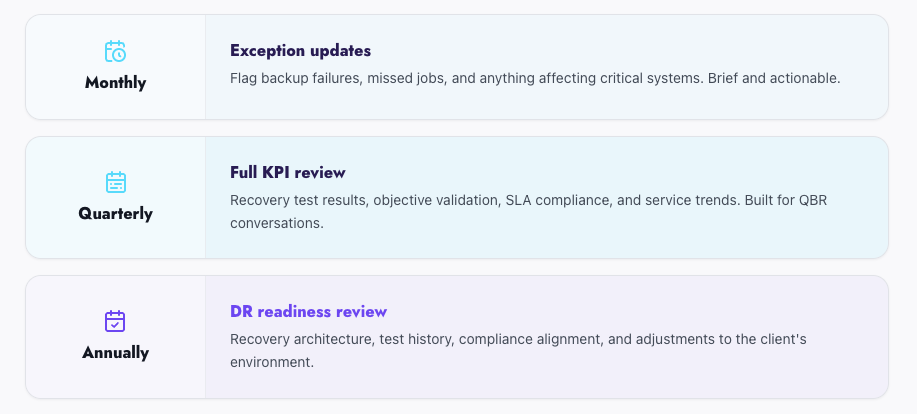
A practical cadence:
Monthly: Short, exception-based updates. Flag backup failures, missed jobs, and anything affecting critical systems. Keep it brief and actionable.
Quarterly: The full KPI review. Recovery test results, objective validation, SLA compliance, and service trends. This is the format built for QBR conversations, and it gives enough time between reports to show real movement.
Annually: A higher-level DR readiness review covering recovery architecture, test history, compliance alignment, and any adjustments driven by changes in the client’s environment.
Make Backup and Recovery KPIs Easier to Prove
Reporting on backup success is straightforward. Most backup platforms generate job summaries automatically. The harder part is reporting on recovery readiness, because recovery readiness has to be earned through testing.
That is where the recovery KPIs break down. Without a consistent testing process, verified recovery success and objective validation are difficult to produce, and MSPs fall back on reporting activity instead of outcomes.
Cloud IBR closes that gap. With automated DR testing built into the platform, MSPs can validate recoverability on a schedule, confirm whether recovery objectives are being met, and generate white-labeled, client-ready reports without manual effort or always-on standby infrastructure.
With Cloud IBR, MSPs can:
- Run automated recovery tests on a daily, weekly, or monthly schedule
- Confirm that backups restore into a functional, usable environment
- Validate whether recovery meets agreed RTO and RPO targets
- Generate white-labeled reports clients can hand to auditors and insurers
- Recover from existing Veeam backups without replication-heavy overhead
- Pay only when tests or failover run, with no idle infrastructure cost
Clients deserve to know they are protected. Cloud IBR gives MSPs the proof to show them.
How MSPs Can Grow Revenue & Increase Profit Margin in 2026
While the managed services industry continues to show double-digit growth, most MSPs aren’t feeling it. Over half are growing under 10%, and one in five
Modern Backup & Disaster Recovery Architecture: Building Ransomware-Resilient Models That Actually Recover
Updated August 18, 2026 Modern backup strategies often follow the 3-2-1-1-0 rule, but implementation varies widely. Two environments can claim compliance with 3-2-1-1-0 and deliver
MSPs Guide to Choosing a Disaster Recovery Solution
With the growing reliance on digital infrastructure in business activities, there has been a rise in the need for reliable disaster recovery (DR) solutions. Coupled