
What VMware customers and the MSPs supporting them should evaluate before changing hypervisors
Backup and recovery strategy
Moving to Proxmox? Build the Recovery plan Before you migrate
VMware
Proxmox
Teams that migrate VMware to Proxmox don’t have to replace Veeam. Veeam backs up Proxmox VE virtual machines at the image level, so the backup and recovery strategy they already trust can move with them.
The bigger risk is declaring the migration finished too early. A Proxmox migration is complete when the new workloads are protected and their recovery has been tested, not when the last VM boots.
Recovery doesn’t have to change with the hypervisor either. If the Veeam backups of Proxmox workloads sit in a supported repository, Cloud IBR can still recover them on demand into ESXi.
Why are VMware customers looking at Proxmox?
VMware customers are looking at Proxmox because Broadcom changed how VMware is licensed and sold. Broadcom ended sales of new VMware perpetual licenses, moved the portfolio to subscription licensing, and consolidated many products into fewer offerings. For some customers, especially those with smaller or simpler environments, the cost and packaging changes were reason enough to evaluate alternatives.
Large enterprises are making the change in phases rather than all at once. In CloudBolt’s January 2026 survey of 302 IT leaders at large North American companies, 86% said they’re actively reducing their VMware footprint. Just over half (54%) said they’re staying on VMware while reducing their dependence on it. Phased moves leave production split across two hypervisors, so each workload that moves needs its protection and recovery checked on the new platform.
Proxmox appeals to teams that want lower, more predictable costs, open-source technology, and more control over future platform decisions. Proxmox VE also includes an import wizard for VMware ESXi virtual machines, which makes it practical to test as a migration target.
For an MSP, the move is a service change as much as a technology change. Customers will expect the provider to assess the platform, run the migration, protect the new workloads, and deliver the same recovery outcomes they had before. That’s an operational responsibility, and it’s also a chance to build migration, backup, and recovery services around the customer’s new environment.
Can one recovery service cover VMware, Hyper-V, and Proxmox?
One recovery service can cover all three platforms when Veeam protects the workloads and the backups sit in a repository Cloud IBR supports. The recovery destination doesn’t have to match the production hypervisor.
The question came up in a recent partner conversation with an infrastructure provider that supports about 1,000 virtual machines. Some of its VMware and Hyper-V customers are moving to Proxmox. The provider wanted to protect and recover those workloads without building a separate process for each production platform.
Veeam supports Proxmox VE, with limits to plan around
Veeam supports Proxmox VE through the Veeam Plug-in for Proxmox VE in Veeam Backup & Replication. The plug-in creates image-level backups without installing agents inside each VM. It uses native Proxmox capabilities and Veeam worker VMs to move the data to a Veeam backup repository.
These capabilities decide which recovery paths stay open after the move. Veeam Backup & Replication 13.1 documents the following for Proxmox VE:
- Versions: Proxmox VE 8.2 through 9.2, installed from the official Proxmox ISO on x86-64 hardware.
- Backup: agentless, image-level backups of Proxmox VE VMs, plus backup copies in a second location.
- Restore: full VM restore to Proxmox VE, plus file-level and application-item restore.
- Cross-platform recovery: Instant Recovery of Proxmox VE VMs to VMware vSphere, Microsoft Hyper-V, or Nutanix AHV.
- Instant Recovery to Proxmox VE: available, but Veeam lists it as experimental support.
Cross-platform recovery matters because a recovery plan shouldn’t depend on the production hypervisor being available. Support also comes with limits, and some of them decide which workloads can move as they are. Veeam’s considerations and limitations for Proxmox VE include these:
- LXC containers aren’t backed up. The plug-in protects virtual machines only.
- iSCSI disks and passthrough disks attached to VMs are skipped during backup.
- Primary backups can’t go to a Veeam Cloud Connect repository, though Cloud Connect can hold backup copies.
- The connection to Proxmox VE can’t use an account with multi-factor authentication, and IPv6 isn’t supported.
- Instant Recovery to VMware can’t restore UEFI VMs that use MBR, and restored VMs may get the wrong cores-per-vCPU count.
- High Availability (HA) VM settings aren’t restored.
Check each workload against these limits before it moves. A VM that depends on an iSCSI disk, or a service in an LXC container, needs a different protection plan before migration day. Validate the design against your actual configuration, since Proxmox version, Veeam version, storage type, disk layout, and networking all affect support. Treat protecting the workloads and choosing where they’ll recover as two separate decisions.
What should you settle before you migrate VMware to Proxmox?
Before you migrate VMware to Proxmox, settle how each workload will be protected and recovered. A successful backup proves the data was captured. It doesn’t prove the business can bring applications, servers, networks, and user access back online in the time it expects.
Answer these questions before the first production workload moves:
- Which workloads will move, and are their operating systems, applications, disks, and storage configurations supported?
- Will existing Veeam backup policies still meet retention and recovery requirements after the migration?
- Where will backup copies be stored, and are those repositories separated from production?
- If the Proxmox cluster is unavailable, where will the workloads be recovered?
- How will networks, VLANs, firewall rules, VPN access, and application dependencies be recreated?
- What recovery time does the business need, and has that timing been tested at the expected data volume?
- Who manages the recovery, from the first restore through the return to production?
These questions matter for an internal IT team, and just as much for an MSP standardizing services across VMware, Hyper-V, and Proxmox customers. A provider needs one repeatable process that produces a usable recovery environment, and untested, platform-specific restore procedures can’t deliver that.
The recovery plan also has to keep pace with production. New networks, applications, public access requirements, server dependencies, and capacity changes all belong in it.
Don’t carry old backup risks into Proxmox
Old backup risks move to Proxmox with the workloads unless the migration fixes them. A new hypervisor doesn’t make backups immutable, isolated, or recovery-ready, because those protections depend on how the Veeam environment and repositories are designed. Use the migration to review the backup design around the workloads against a ransomware-resilient backup architecture.
Immutable object storage keeps backup objects from being changed or deleted during the retention period. It’s an important protection, but it isn’t the whole recovery strategy. The organization also has to protect the credentials and metadata needed to reach those backups, and keep the backup environment behind its own security boundary. Regular recovery tests prove the backups can actually be used.
The goal is to make sure no attack or infrastructure failure can remove every usable recovery path.
How does Cloud IBR recover Veeam backups of Proxmox workloads?
Cloud IBR recovers Veeam backups of Proxmox workloads into an ESXi recovery environment, with no standby disaster recovery infrastructure for customers or MSPs to maintain. When recovery or testing starts, it builds on-demand recovery infrastructure, imports the Veeam repository, and automates the recovery workflow.
For supported Proxmox backups, recovery happens in two steps. First, Cloud IBR uses Veeam Instant Recovery to boot each server from the backup repository. Then Veeam migrates the server to an ESXi host in the recovery environment.
That means the production hypervisor can change without forcing a change to the backup or recovery tools. The organization has somewhere to run if the Proxmox cluster goes down, and MSPs get a more consistent recovery service across production hypervisors.
MSPs can also configure each customer’s network, access, and recovery settings ahead of time, rather than rebuilding them during an incident.
How it works
From Proxmox production to recovery on demand
Veeam-protected workloads can remain part of the Cloud IBR recovery strategy after a hypervisor change.
- 1
Proxmox VE Production
Protected virtual machines run in the live environment
- 2
Veeam Backup & Replication
Image-level backups protect the workloads
- 3
Supported Veeam Repository
Backups remain available outside production
- 4
Cloud IBR ESXi Recovery Environment
Instant Recovery boots the server, then Veeam migrates it to the ESXi host
No standing DR
Changing the production hypervisor doesn’t have to break the recovery strategy.
Cloud IBR | Disaster recovery for Veeam backups. Made easy.
Test recovery before you call the migration complete
Testing recovery is the step that finishes a Proxmox migration. When the last VM starts on Proxmox, you know the move worked. A recovery test is what shows those workloads can come back after a failure. If staff time is what keeps tests from happening, disaster recovery testing can be automated.
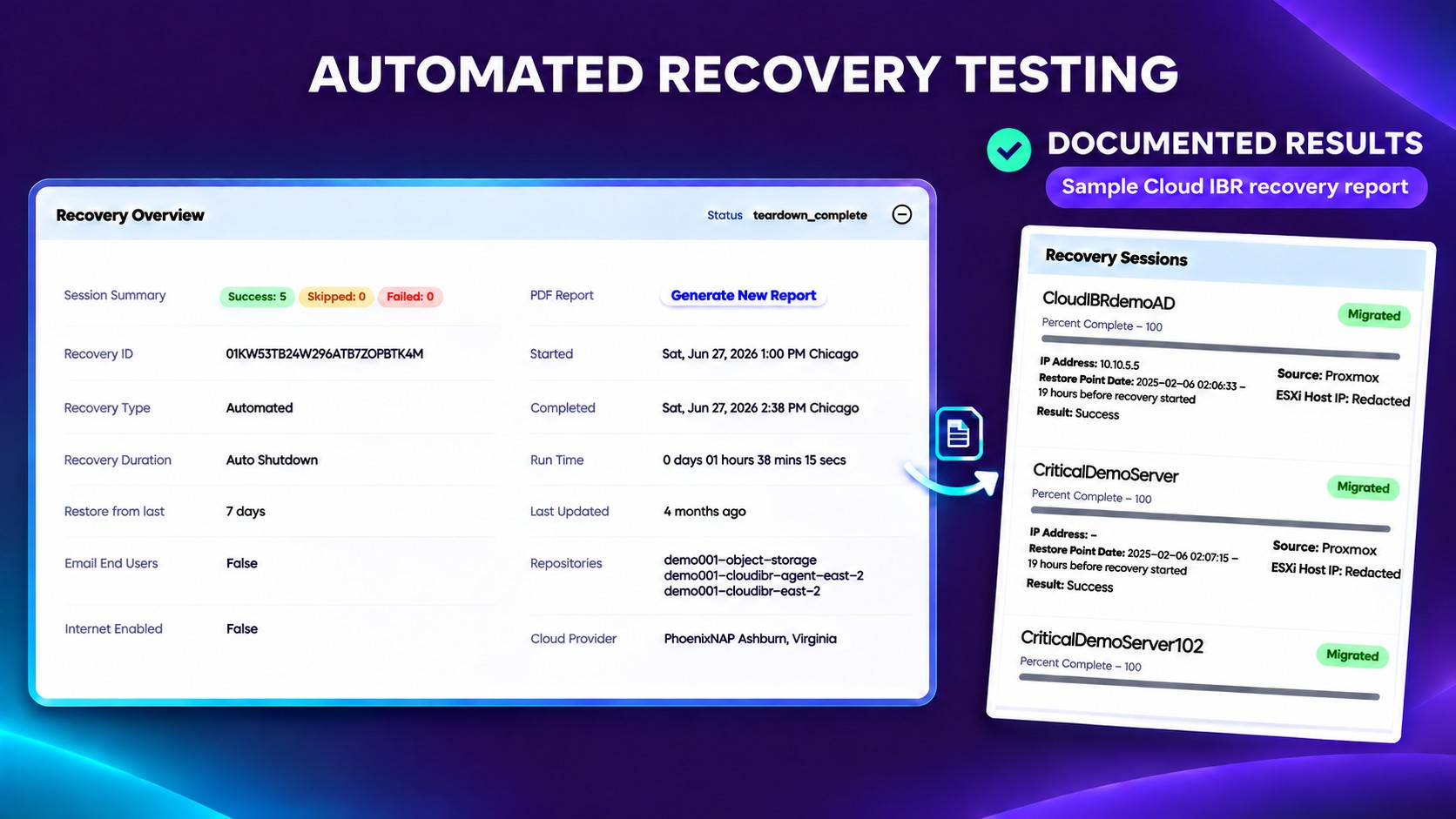
A useful test covers more than a single VM restore. It checks applications, boot order, networking, remote access, dependencies, and the total time to deliver a working recovery environment. The results should record what was restored, which servers started, how long the process took, and what stayed untested.
That record shows the scope and result of the test. On its own, it doesn’t prove application usability, user acceptance, malware-free recovery, or full business continuity.
For Proxmox backups, the Recovery Overview report uses Migrated, Mounted, and Migrating statuses to show the stage and result of each server recovery. A green Migrated status means Instant Recovery succeeded, the server booted, and Veeam finished migrating it from the repository to the ESXi host. A red Mounted status means the server booted but the migration step failed, and Cloud IBR retries that step once automatically. A gray Migrating status means the migration is still in progress.
Changing hypervisors can provide more flexibility and reduce dependence on one vendor. The backup and recovery strategy should provide the same freedom.
Plan recovery before the first workload moves
Planning recovery before the first workload moves leaves time to close gaps. Confirm Veeam compatibility, repository design, isolation, recovery destinations, networking requirements, and who owns testing.
If your organization or your customers are evaluating Proxmox, Cloud IBR can review how your Veeam-protected Proxmox workloads fit an on-demand, tested recovery strategy. The review covers what can stay in place, what needs to change, and how recovery will work after the move.
Source references
- VMware by Broadcom, “VMware End of Availability of Perpetual Licensing and SaaS Services,” January 22, 2024.
- CloudBolt Software, “The Mass Exodus That Never Was: The Squeeze Is Just Beginning,” survey of 302 IT decision-makers at North American companies with 1,000 or more employees, January 2026.
- Proxmox Server Solutions, Proxmox VE 8.2 release announcement, including the VMware ESXi import wizard, April 2024.
- Veeam Help Center, “Proxmox Virtual Environment,” Veeam Backup & Replication 13 User Guide.
- Veeam Help Center, “Proxmox VE” platform support and supported versions, Veeam Backup & Replication 13 User Guide.
- Veeam Help Center, “Considerations and Limitations” for Veeam Plug-in for Proxmox VE, Veeam Backup & Replication 13 User Guide.
- Veeam Help Center, “Performing Instant Recovery to Proxmox VE” (experimental support status), Veeam Cloud Connect Guide.
- Cloud IBR Knowledge Base, “What do the Mounted, Migrated and Stopped statuses mean on the Recovery Overview report?”
Related Posts
Cloud IBR: Simplifying Veeam Vault Instant Recovery to Azure – What IT Teams Need to Know
Updated 8/20/26 Veeam Vault + Azure instant recovery can work. But only if you already have: Azure infrastructure fully configured Compute quotas approved and available
MSPs Have Backups. That Doesn’t Mean They Have Recovery.
What MSPs are getting wrong about disaster recovery — from MSP Expo 2026. Most MSPs already have Veeam backups in place. But when it comes
How MSPs Can Define Realistic Recovery Metrics for Clients
When RTO and RPO show up in a proposal or SLA, they stop being technical terms and start becoming service commitments. That is where many
Frequently Asked Questions
Yes. Veeam Backup & Replication supports Proxmox VE virtual machines through the Veeam Plug-in for Proxmox VE. It creates agentless, image-level backups and restores full VMs, files, and application items.
Veeam Backup & Replication 13 supports Proxmox VE 8.2 through 9.2, installed from the official Proxmox ISO on x86-64 hardware. ARM machines aren’t supported. Check your Proxmox and Veeam versions against Veeam’s current requirements before you migrate.
No. The Veeam Plug-in for Proxmox VE backs up virtual machines, and LXC containers aren’t supported. Services that run in containers need a separate protection plan before they move.
Yes. Veeam supports Instant Recovery of Proxmox VE VMs to VMware vSphere, then migration to an ESXi host. Veeam lists two limits: UEFI VMs that use MBR can’t be restored, and restored VMs may get the wrong cores-per-vCPU count. Cloud IBR uses this path to recover Proxmox workloads into its ESXi recovery environment.
Instant Recovery to Proxmox VE is available, but Veeam lists it as experimental support. Test it before you depend on it, and plan production recovery around a fully supported destination.
Most are reducing VMware rather than leaving it all at once. Broadcom ended sales of new perpetual licenses and moved VMware to subscription licensing. In CloudBolt’s January 2026 survey of 302 IT leaders at large North American companies, 86% said they’re actively reducing their VMware footprint.