
If an IP address needed to access BMC resources was not entered to the BMC Remote Access tab before running a recovery, the IP can be added through the IBR firewall and ESXi server(s) at any time after the IP address of the IBR firewall is displayed in the Cloud IBR portal. Please be sure to allow access on both the IBR firewall and the ESXi server(s).
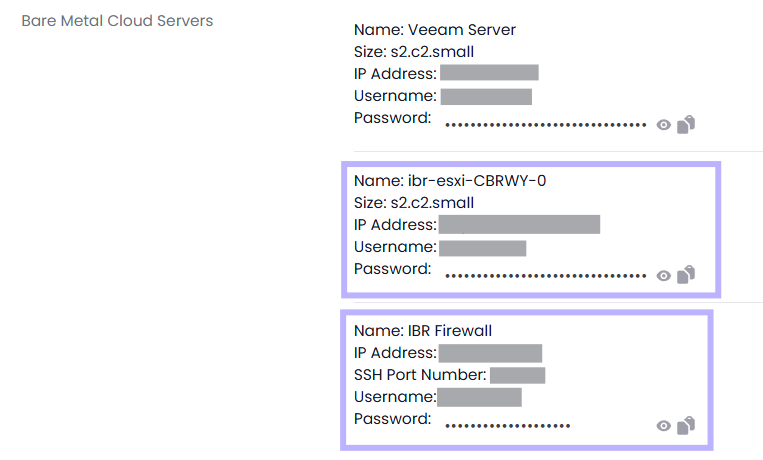
Adding Access to the IBR Firewall:
- Run the following command, replacing x.x.x.x with the WAN IP you wish to whitelist:
sudo ufw allow in on ens160 from x.x.x.x to any
- Run this command to confirm the rule was added:
sudo ufw status numbered
- If a rule was entered incorrectly, use the below command to delete the rule so that you can re-add:
sudo ufw delete [rule_number]
Adding Access to the ESXi host(s):
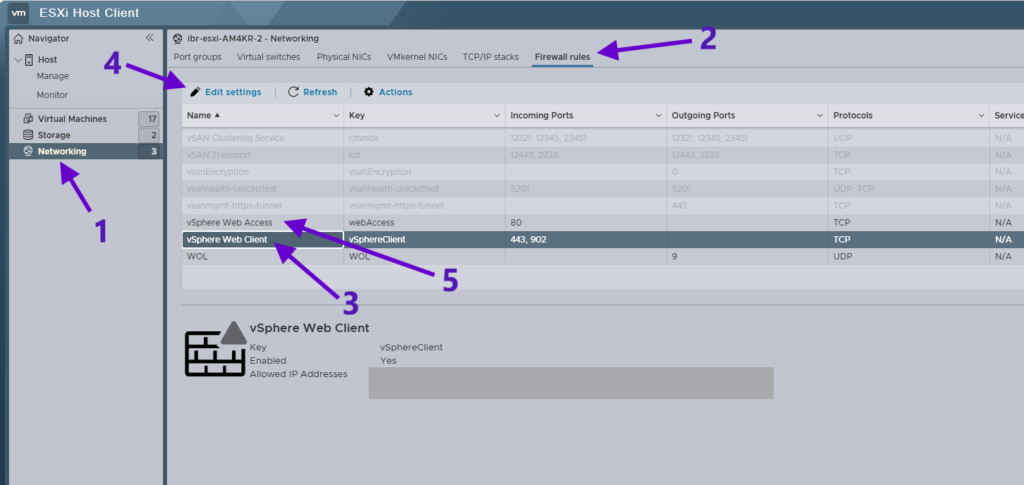
1. Open Networking Settings
- Log in to the ESXi Host Client.
- In the left navigation pane, select Networking.
(Reference: Step 1 in the screenshot)
2. Open Firewall Rules
- At the top menu, click the Firewall rules tab.
(Reference: Step 2 in the screenshot)
3. Select the vSphere Web Client Rule
- Locate vSphere Web Client in the firewall rules list.
- Click the rule to highlight it.
(Reference: Step 3 in the screenshot)
4. Edit Allowed IP Addresses
- Click Edit settings.
- Change the allowed IP configuration:
- Add the required IP address to Allowed IP Addresses.
- Click Save.
(Reference: Step 4 in the screenshot)
5. Select the vSphere Web Access Rule
- Repeat steps 3 and 4 above to add the required IP address to vSphere Web Access Rule.