
Overview
This article explains how to locate your access keys in the Veeam Data Cloud Vault console and what to do if the keys are not visible.
Steps to Find Your Access Keys
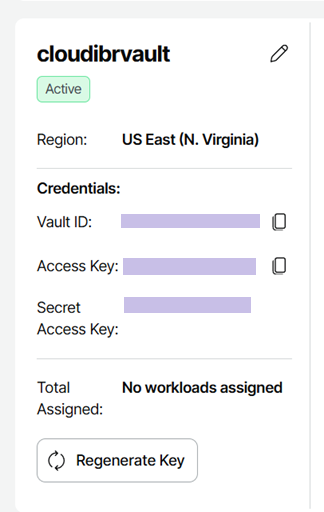
- Log in to your Veeam Data Cloud Vault console.
- Navigate to the section where access credentials are managed (as shown in the reference image provided).
- Look for existing keys listed on the page.
- If keys are already available, you will see them displayed along with a “Regenerate” button.
- You can use the existing key or regenerate it if needed.
If You Do Not See Any Keys
If the key management section is not visible in your console:
- This typically means that key visibility is not enabled for your vault.
- You will need to contact Veeam support to enable this feature.
Next Steps:
- Open a support ticket with Veeam.
- Request that key visibility be enabled for your Veeam Data Cloud Vault.
- Once enabled, return to the console and refresh the page.
You should then see the interface (as shown in the provided image), allowing you to create and manage keys.